Yes. For most active listings, a 3D virtual tour meaningfully increases buyer engagement, and you should pick a capture path today, not after the listing goes live. Phone LiDAR handles budget properties fine; hire a pro for luxury homes or anything with an unusual layout. The payoff is faster qualified traffic and fewer wasted showings.
TL;DR:
- 3D tours significantly boost listing views and saves, especially for luxury, odd-layout, remote, or pre-construction homes, and are most impactful when integrated into a comprehensive marketing strategy.
- The cost for DIY tours ranges from free to about $50, mid-tier options cost $50 to $300, while professional captures for high-end properties typically cost $150 to over $600, with turnaround times from same day to a few days.
- Publishing and syndicating a tour across MLS, portals, and social media maximizes visibility, with analytics helping assess the tour's impact on inquiries, views, and market days.
- Privacy concerns demand explicit occupant consent, careful removal of identifiable personal items, and understanding data storage policies, since poorly managed tours pose legal risks.
Table of Contents
- What Does a 3D Virtual Tour Actually Deliver for a Listing?
- How Do You Capture a 3D Tour on a Budget, a Mid Tier, or a Pro Level?
- Which 3D Tour Platform Fits Your Listing Budget?
- How Do You Publish and Syndicate a Virtual Tour Once It's Ready?
- What Should a 3D Tour Cost, and How Fast Should It Turn Around?
- How Beams Realty Group Decides When to Use a 3D Tour
- What Legal and Privacy Issues Come With 3D Tours?
- Why the Real Value of 3D Tours Isn't the Wow Factor
- Get Full-Service Help Turning Tours Into Closed Sales
- Sources
What Does a 3D Virtual Tour Actually Deliver for a Listing?
A 3D virtual tour gives buyers three things a photo gallery can't: a dollhouse view of the whole floorplan, room-to-room measurements, and the ability to walk the space on their own schedule. That last part matters more than agents give it credit for. Out-of-town buyers, relocation clients, and anyone juggling a work schedule around showings can tour a home at 11 PM on a Tuesday.
Zillow reports that listings with interactive floor plans and 3D Home tours receive noticeably more views and saves than listings with photos alone. That's not a marginal bump; it changes which listings surface in a buyer's mental shortlist.
Tours earn their place fastest on:
- Luxury properties where square footage and flow justify a deeper look
- Homes with odd or split-level floorplans that photos flatten and confuse
- Listings targeting remote or relocating buyers
- Pre-construction units that don't exist yet to photograph
- Rentals, where prospective tenants want a no-commitment first look
None of this replaces the agent. The National Association of Realtors is explicit that virtual tours should complement, not substitute for, personalized guidance from a licensed professional. A tour gets a buyer emotionally invested and pre-qualified; you still close the deal.
How Do You Capture a 3D Tour on a Budget, a Mid Tier, or a Pro Level?
Pick your capture method based on the property's price point and complexity, then follow through with a consistent process. Here's how each tier actually works.
1. DIY phone LiDAR (budget listings, under roughly $400K, straightforward layouts)
Use an iPhone Pro model or an Android with LiDAR support. Walk each room slowly, keeping the phone at chest height, and let the scanning app finish a full sweep before moving to the next doorway. Rushing corners is the single most common mistake; it creates warped dollhouse geometry that buyers notice immediately.
2. 360 camera workflow (mid-market homes, agents scaling volume)
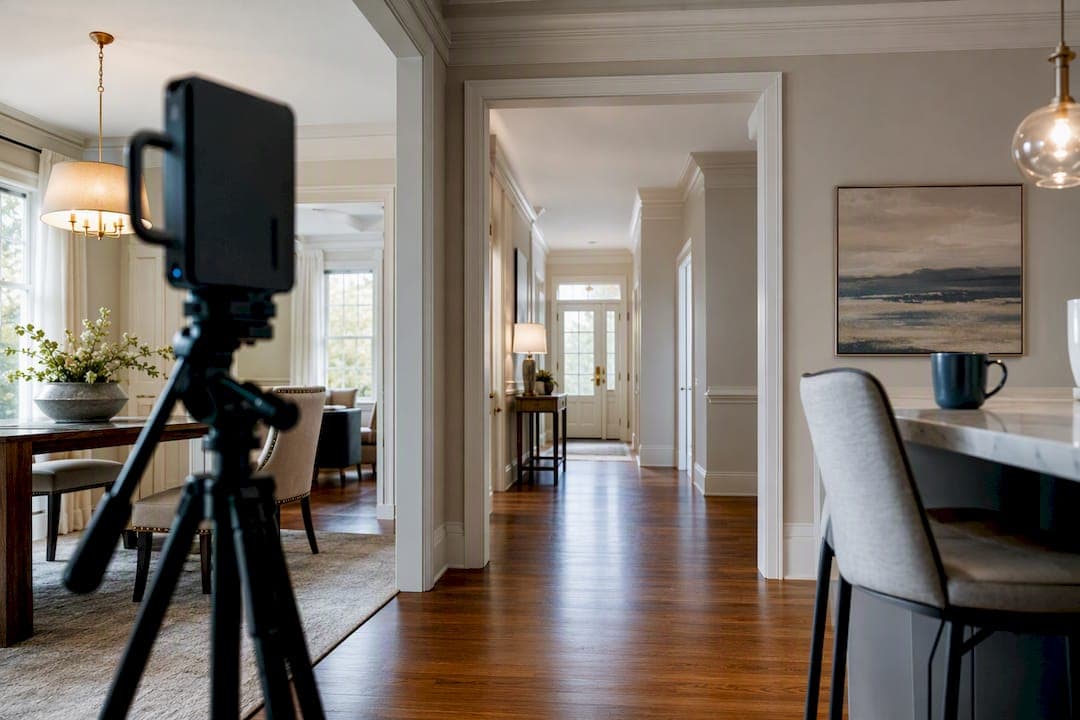
Mount a 360 camera on a tripod at roughly 5 feet, shoot every 8 to 10 feet of hallway or open space to keep overlap tight, and let the stitching software handle the panoramas. Expect to spend 15 to 20 minutes editing hotspots and blurring reflections before publishing.
3. Professional capture (luxury, historic, or architecturally complex properties)
A pro brings a dedicated 3D scanner and delivers a full package: measured floorplans, a dollhouse view, and often OBJ or point cloud exports for high-end marketing or renovation planning, as detailed in marketing approaches for luxury homes at YH Luxury Homes | Yelena Horton. Ask for these exports up front; not every vendor includes them by default.
Preparation checklist before anyone shows up with equipment: declutter every surface, turn on all interior lights, open blinds for natural light, and shoot the exterior last so landscaping photographs in good light. A staging pass ahead of capture day pays for itself in how the finished tour reads to buyers.
Pro Tip: Shoot 360 or LiDAR passes before you stage furniture accents like throw pillows or fresh flowers. Scanners occasionally misread small, low-contrast objects, and a clean structural scan is easier to touch up than a distorted one.
Which 3D Tour Platform Fits Your Listing Budget?
Three categories cover almost every listing scenario, and they differ mainly in how much structure and lead capture you get beyond the walkthrough itself.
Hosted 3D platforms with measurements. Matterport markets itself as an end-to-end system, turning a scan into an immersive walkthrough with measurements and marketing-ready assets. This category suits agents who want a repeatable, professional-grade output across every listing, not just the high-end ones.
Next-gen free-move 3D. Kukan pushes past the classic panorama with a photorealistic free-move experience and a conversational AI guide trained on the specific property. Buyers can effectively ask the tour questions about the home. It's a newer category, and it tends to produce stronger engagement signals than a static 360 tour because buyers interact rather than just click through.
Basic 360-photo stitchers. Free or low-cost apps that stitch panoramas into a clickable tour, similar in spirit to how institutions like Mount Vernon built their 360 visitor experience. Fine for straightforward listings; thin on measurements or lead capture.
Match the category to the goal:
- Testing whether tours move the needle on your local listings at all: start with a free DIY app
- Running tours across your whole pipeline: a subscription platform with hosting and analytics
- Marketing a signature or high-value property: hire a pro with full measured-floorplan delivery
How Do You Publish and Syndicate a Virtual Tour Once It's Ready?
Getting the tour built is half the job. Getting it in front of buyers requires deliberate publishing.
- Get a hosted link from your platform and drop it directly into your MLS listing where the system allows a virtual tour URL field
- Use Zillow's free 3D Home app to capture and syndicate the tour across Zillow's network without extra software
- Embed the tour on your own listing page and brokerage website with a descriptive caption and a thumbnail image, not a bare link
- Add a visible call-to-action near the embed inviting buyers to schedule an in-person showing
- Share a clipped preview to social platforms with the full tour link in the caption
- Check your platform's basic analytics dashboard weekly to track views, time spent, and repeat visits
Syndication is where the free-view lift actually compounds. A tour buried on a single web page reaches far fewer eyes than one distributed through MLS, a major portal, and social in the same week.
What Should a 3D Tour Cost, and How Fast Should It Turn Around?
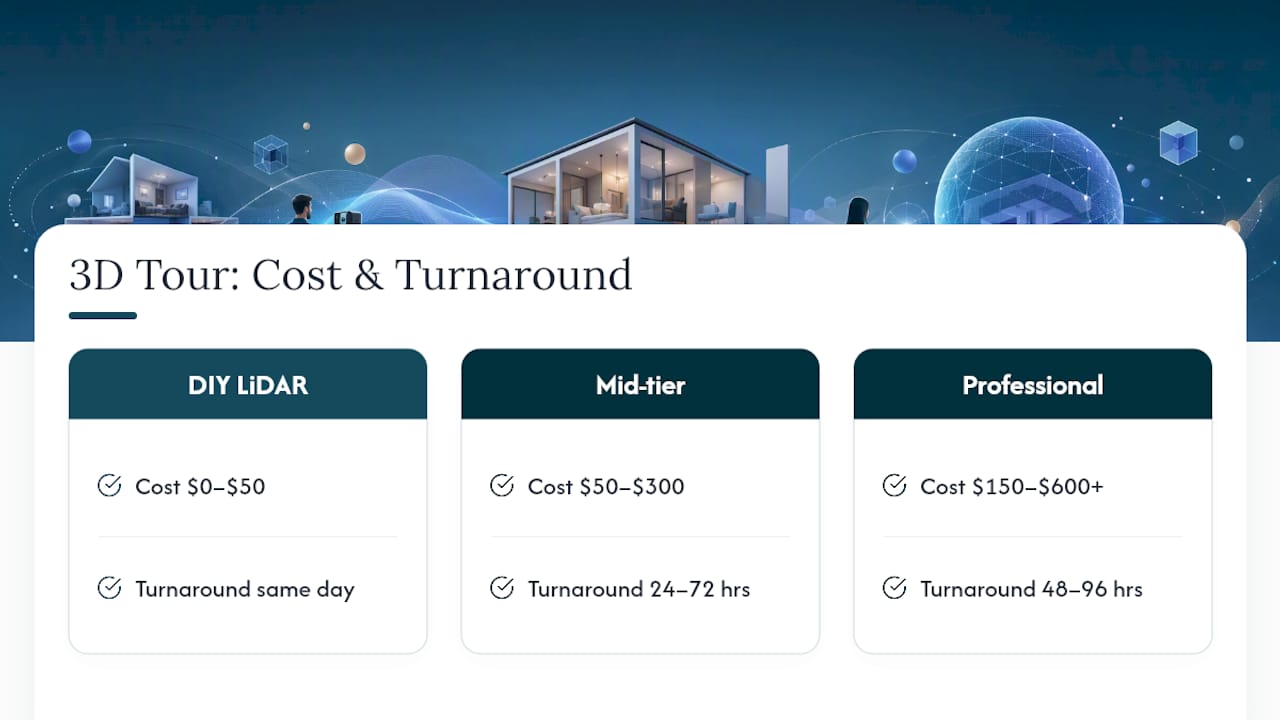
Budget realistically depends on which capture tier you choose. DIY phone LiDAR runs free to about $50 in app or export fees. Mid-tier subscription platforms or per-tour services land between $50 and $300. Professional capture for larger or architecturally complex homes typically runs $150 to $600 or more.
Turnaround follows the same tiers: DIY tours publish same day, mid-tier platforms typically deliver in 24 to 72 hours, and professional captures usually land in 48 to 96 hours once editing and floorplan generation are done.
For measuring whether it paid off, Zillow cites cases where listings with interactive floor plans and 3D Home tours saw substantially higher views and saves than photo-only listings. Track that same pattern locally: views in the first 72 hours, save rate, inquiry-to-showing ratio, and whether days on market shortens compared to your typical listings. Pair those numbers against your comparative market analysis to see whether the tour's cost was worth it relative to the home's price point.
How Beams Realty Group Decides When to Use a 3D Tour
Our approach starts with the seller's goal and the listing's price point, not a default vendor. A starter home in a competitive Virginia market often gets a fast phone LiDAR scan so it hits the MLS within a day. A higher-value or architecturally distinct property gets a professional capture, closer to how a digital twin preserves an architecturally significant home for both marketing and future reference.
We also use tours before a listing goes live, to pre-qualify remote buyers and to test staging decisions with the seller before committing to a full photo shoot. That saves everyone a wasted trip. If you're weighing whether full agent representation makes more sense than going the solo sale route, the tour is one small piece of a much bigger marketing plan we build around every listing.
What Legal and Privacy Issues Come With 3D Tours?
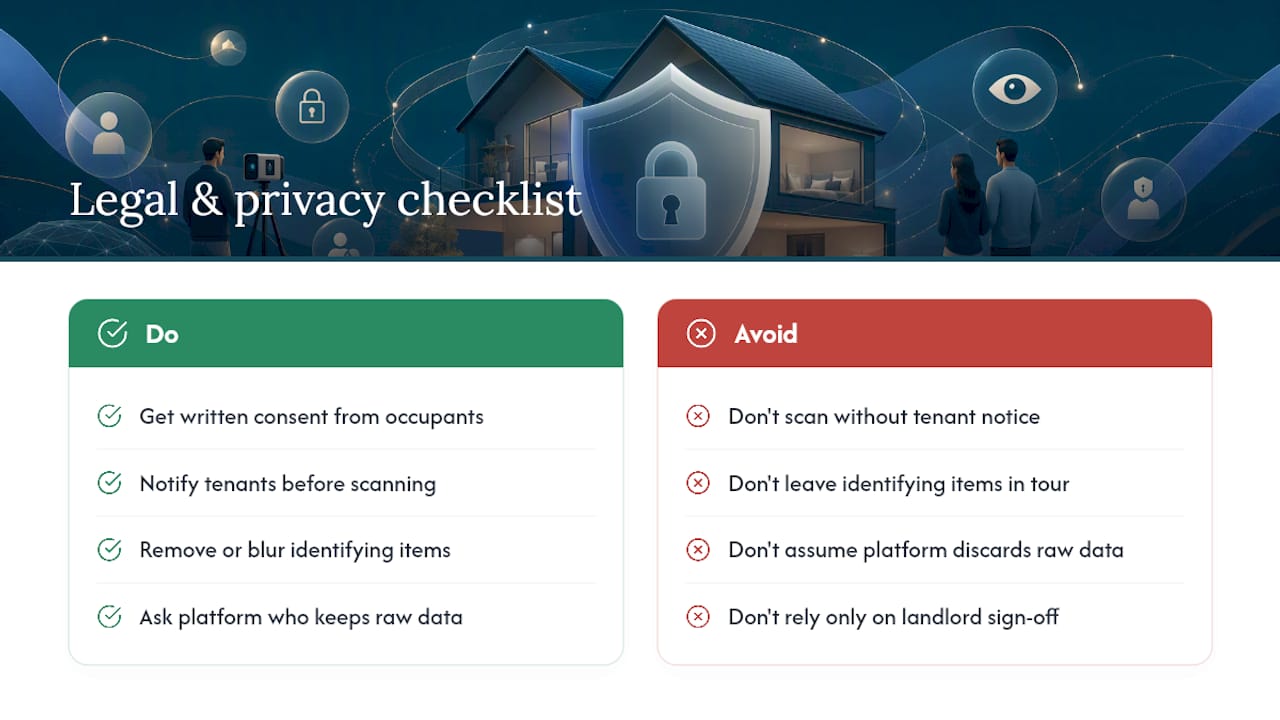
A 3D scan captures more than most sellers expect. Get explicit written consent from occupants before scanning an occupied home, and if the property is a rental, notify tenants in advance rather than scheduling around them. Mailboxes with visible names, family photos, personal documents on a desk, and even car license plates in a garage can all end up in a published tour. Walk through and remove or blur anything identifying before the scan, not after.
Where the tour is hosted matters too. Ask your platform what happens to raw scan data, whether it's stored indefinitely, and who can access it after the listing closes. Some platforms retain point cloud or measurement data for their own product development; sellers deserve to know that before they agree to a scan. If a listing sits in a neighborhood with HOA restrictions on photography or drone use for exterior capture, confirm those rules before you show up with equipment.
For commercial properties, add another layer: check whether tenants, employees, or proprietary signage will appear in the scan, and get sign-off from the property manager or business owner, not just the landlord. None of this is complicated, but skipping it turns a marketing asset into a liability fast.
Why the Real Value of 3D Tours Isn't the Wow Factor
Most agents talk about 3D tours like they're a marketing flex, a way to look modern. That's the wrong frame. The real value is filtering: a good tour lets an unqualified or geographically distant buyer rule themselves out before they book your time. Fewer wasted showings, not more foot traffic, is the actual win.
Conventional advice oversells the technology and undersells the process around it. A pro-grade Matterport scan on a poorly staged, badly lit home will still underperform a well-prepared phone LiDAR scan. Preparation beats hardware almost every time.
If you're prioritizing anything, prioritize consent and privacy review before you prioritize which platform to buy. It's the step most agents skip, and it's the one that actually creates risk. The technology choice matters far less than most vendors want you to believe.
— Myra
Get Full-Service Help Turning Tours Into Closed Sales
Beams Realty Group handles the whole listing rollout, not just the scan. We coordinate capture with the right method for your property, host and edit the finished tour, and fold it into syndication across MLS, portals, and social so it actually gets seen. Sellers get a clear timeline, a defined set of deliverables, and one point of contact from staging through closing.
That means you're not choosing between a DIY app and a freelance scanner and hoping it works out. We build the tour into a full marketing plan tied to your local market, priced against comparable sales, and paired with the kind of hands-on negotiation support a tour alone can't provide. If you're preparing a listing in Virginia and want that handled end to end, start with a conversation through Beams Realty Group's listing and marketing services and we'll map out the right capture path for your property.
Sources
- Virtual showings and virtual tours — NAR
- Capture 3D Virtual Tours with Free 3D Home App | Zillow
- Create 3D Virtual Tours for Real Estate | Matterport
- AI virtual tours for real estate — Kukan